Binaural, properly
ambitap.binaural~ has been quietly rendering your scenes since Chapter
3. This chapter opens that box: what an HRTF really is, why the object
offers two flavors of the same ears, when to bring your own, and how to
make headphone spatial audio survive contact with an audience of
strangers' heads.
Companion patch: patchers/booklet/08-binaural.maxpat.
The ears in the machine
Chapter 1's cues — timing, shadow, pinna spectra — can be measured: put microphones in the ear canals of a head, play a sweep from hundreds of directions, record what arrives. The result, direction by direction, is the head-related transfer function: a pair of filters that turn "a sound from over there" into "what each eardrum receives." Render a source by convolving it with the pair for its direction, and you've forged the complete cue set — which is all binaural rendering is.
AmbiTap's built-in head is KEMAR — the standard measurement mannequin (the MIT Media Lab's classic 1994 dataset), embedded in the library as a spherical-harmonic projection to order 5, resampled automatically to your session rate. Two consequences you've already experienced: it works with zero configuration, and its pinnae are not yours (Chapter 3's "elevation may feel vague").
Rendering a whole scene — sixteen channels of coincident patterns, not one source — works because the HRTF set itself can be expressed in the same spherical-harmonic language as the bus: the renderer convolves your scene channels with an SH-domain filter bank, and every source, room reflection, and recorded bird in the bus lands at both eardrums with the right cues, in one pass. That's why the object's cost is flat however crowded the scene gets (Chapter 9's scaling argument).
ls versus magls — the audible choice
The object's hrtf_dataset attribute offers two projections of the same
KEMAR measurements, and the difference is a genuine listening decision,
so here it is measured — the reconstructed ear responses at order 3 for a
hard-left source:
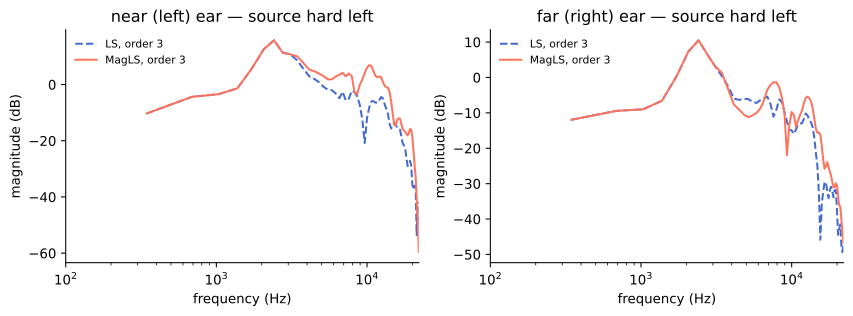
The issue: order 3 can't carry the full directional fineness of high-frequency ear acoustics (the same order-limit as everything else — Chapter 7). Above that limit, something must give:
ls(least-squares) keeps the waveforms as faithful as the order allows — phase, timing, everything — and pays by shedding high-frequency energy where the order runs out (the dashed line sagging at the shadowed ear above ~5 kHz). Sounds: duller, slightly in-the-head up top, with the most literal ITDs.magls(magnitude least-squares) declares high-frequency phase perceptually negotiable — above the limit your ears mostly read magnitude anyway — and spends the order budget holding the magnitude response instead (the solid line tracking full brightness). Sounds: brighter, more open, better externalization and high-frequency localization. The modern default recommendation, here and in the literature it comes from (Schörkhuber & Höldrich et al., 2018-vintage research; Appendix D).
A/B them in the companion patch (hrtf_dataset ls / hrtf_dataset magls — the swap crossfades) on cymbals or noise at a side angle. Most
listeners land on magls and stay.
Bringing your own ears: SOFA
Borrowed ears cap the ceiling (Chapter 7's rider #1). The industry's answer is the SOFA file (Spatially Oriented Format for Acoustics) — a standard container for measured HRTF sets, and the object accepts one:
[sofa /path/to/yours.sofa]      ← projected onto the SH basis at this
                                   object's order, resampled to the host
                                   rate; [sofa] with no path reverts to KEMAR
Where a personal file comes from, realistically, in 2026: an acoustics lab measurement (rare, wonderful), a photogrammetry service (apps that derive an HRTF from photos of your ears — commercial, variable, improving), or a chosen stranger — public databases (the HUTUBS and ARI collections, the SADIE II set, and others) hold dozens of measured heads, and picking the one that localizes best for you already beats the mannequin. Expect the biggest personal-HRTF gains exactly where the mannequin is weakest: elevation and front/back stability.
Head tracking, made real
Chapter 4 taught the principle (counter-rotate the scene) and the
division of labor (binaural~'s own yaw/pitch/roll are the
listener's head). What remains is plumbing: any device that emits
orientation — a phone strapped to headphones (free apps stream
gyroscope data as OSC), a dedicated tracker, a webcam face-tracker —
becomes three messages:
[udpreceive 7500] → [route /yaw /pitch /roll] → [yaw $1] etc. → [ambitap.binaural~ 3]
(Angles in radians as always; convert per your driver.) Rotation rebuilds happen off the audio thread and crossfade in, so tracker jitter doesn't zipper. Two rules of thumb from the VR world: total motion-to-sound latency under ~50 ms reads as solid; and even cheap tracking transforms realism, because Chapter 1's tie-breaker — cues that respond to your movement — matters more than cue perfection.
Craft notes for headphone delivery
- Externalization stack:
magls+ a room (Chapter 11 — one floor reflection outsells any HRTF upgrade) + head tracking if you have it. In that order of effort, that order of payoff. - Level: the renderer's
volumeattribute ramps smoothly — use it as the master, and mind that HRTF peaks can push hot mixes into clipping; leave a few dB. - EQ after, not before. Headphone-compensation or taste EQ belongs on the stereo output, downstream of the renderer; EQ on the bus changes the scene, EQ after changes the headphones.
- Strangers' heads: delivering binaural renders to the public means KEMAR-versus-everyone; expect front/back flips among listeners. Ship head-tracked (an app, a web player) when stakes are high; for a fixed file, favor material whose staging survives blur — motion, music, ambience over pinpoint statics.
Checkpoint
Binaural = measured ear filters; the bus renders through them in one SH
pass at any scene size; magls is the modern pick; SOFA opens the door
to better-than-mannequin ears; tracking is three OSC messages and pays
absurdly well. You can now render anything to anyone — next problem:
seeing what you're doing in a medium with no waveform display. The
scene needs instruments.