Fifteen minutes to 3D
Theory is over for a while. In this chapter you install the AmbiTap package, build a four-object patch, and hear a sound orbit your head — behind you, above you, all the places Chapter 1 established that stereo cannot go. Then we look at what's flowing through the patch cords, because you will have just used an ambisonic bus without ceremony, and it deserves thirty seconds of admiration.
You need: Max 9, headphones, and about fifteen minutes.
Install the package
Clone and build the Max package (it pulls the AmbiTap library and the
Cycling '74 min-api as git submodules; CMake ≥ 3.24 and a C++20 compiler
required — on macOS that's Xcode's command-line tools):
git clone --recurse-submodules https://github.com/tap/AmbiTap-Max.git
cd AmbiTap-Max
cmake -B build -S . -DCMAKE_BUILD_TYPE=Release
cmake --build build
# externals land in externals/
(If you don't have node/npm installed, add -DAMBITAP_MAX_BUILD_UI=OFF —
it skips the optional UI widgets, which this chapter doesn't use.)
Then let Max see the package — symlink (or copy) the folder into your Packages directory:
ln -s "$PWD" ~/Documents/Max\ 9/Packages/AmbiTap-Max
Restart Max, create a new patcher, and type ambitap.encode~ into an
object box. If it turns into a real object instead of staying amber-broken,
you're installed. (Every object also has a help patch — right-click →
Open Help — which is the package's own reference; this book will lean on
them.)
The patch
Open patchers/booklet/01-first-sounds.maxpat from the package — or
build it yourself; it's small enough to type:
[pink~]
   |
[ambitap.encode~ 3]        ← mono in, ambisonic scene out
   |                          (one thick mc patch cord)
[ambitap.binaural~ 3]      ← scene in, your two ears out
   |    \
[dac~ 1 2]
Four boxes. Note the 3 on both objects — that's the ambisonic order,
and the two must match (the encoder speaks a 16-channel scene at order 3,
and the renderer must expect the same 16 — give both objects the same
number, always). Note also the patch cord between them: it's drawn thicker
than a normal signal cable. That's a Max multichannel (mc.) connection
— one cord, sixteen channels inside it.
Headphones on. Volume low. Start the audio (ezdac~/speaker icon or the
Audio On toggle in the companion patch). You should hear pink noise,
dead ahead, slightly outside your head — already not the
between-the-ears image plain stereo gives on headphones.
Move it
ambitap.encode~ takes an azimuth message — the source's horizontal
angle. One catch, and it's a convention you'll meet across the whole
ambisonics world: angles are in radians, with 0 = front and positive
angles moving left (counterclockwise seen from above, the math world's
habit). Degrees are more comfortable to patch with, so scale them:
[dial]  (range 0–360)
   |
[expr $f1 * 3.14159265 / 180.]
   |
[azimuth $1]
   |
[ambitap.encode~ 3]
Drag the dial slowly and listen: 90° is hard left, 180° is behind you, 270° hard right. Then close your eyes and have the patch do the driving — a slow orbit:
[phasor~ 0.05]                 ← one revolution every 20 seconds
   |
[snapshot~ 30]
   |
[expr $f1 * 6.2831853]
   |
[azimuth $1]
Elevation is the same story: elevation $1, radians, 0 = horizon,
+1.5708 (π/2) = directly overhead, negative = below. Send elevation 0.8
while the orbit runs and the circle tilts up toward the zenith.
Sit with it for a minute. A mono noise source, four object boxes, and you have a sound behind and above you on ordinary headphones. Chapter 1 said elevation and rear placement live in fragile, personal spectral cues — what you're hearing is those cues being forged, in real time, from a measurement of a standard mannequin head (the KEMAR — the same dataset the book's Chapter 1 figure was computed from). Yours differs from the mannequin's, so elevation especially may feel vague or compressed to you; that's expected, it varies person to person, and Chapter 13 is about doing better. Front/back may occasionally flip — you can't turn your head to disambiguate yet. That's Chapter 4.
What just happened
Trace the signal. pink~ is one channel. ambitap.encode~ 3 turned it
into sixteen — hang an mc.scope~ or mc.meter~ on that thick cable
and count. Sixteen copies of the same noise, at sixteen different gains,
and the pattern of gains encodes the direction: this is the scene-based
storage from Chapter 2 made concrete. Wiggle the azimuth dial and watch
the meters redistribute while the sound moves.
Why sixteen? Order 3 → (3+1)² = 16 channels. Order 1 would be 4 channels, order 5 would be 36. What does the order buy? Sharpness. Here is the directional resolving power of a scene at orders 1, 3, and 5 — computed from the library itself, as a polar pattern pointed at your source:
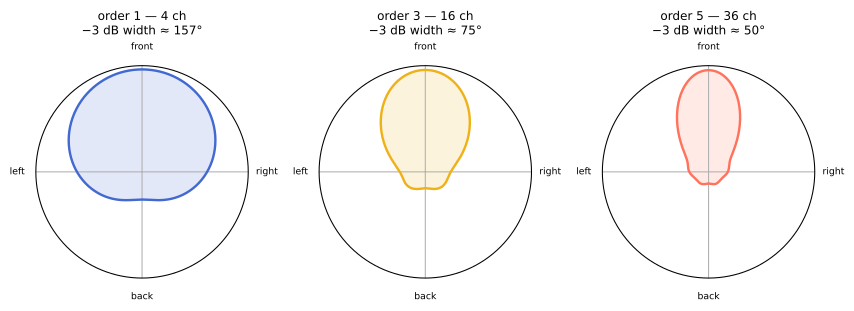
At order 1 the scene knows the sound is "leftish." At order 3 it knows rather precisely. Order 3 at 16 channels is this book's default: sharp enough to be convincing, cheap enough to run stacks of. The full which-order-do-I-need treatment — with the perceptual caveats that make it interesting — is Chapter 7.
ambitap.binaural~ 3 then collapsed the sixteen back to two — but not by
mixing. It rendered the scene to your ears through the HRTF machinery of
Chapter 1: for the field those sixteen channels describe, it computes what
would have arrived at each eardrum, timing, shadow, pinna-notches and all.
Encoder writes the scene; renderer reads it for a device. Everything else
in this book lives between those two boxes.
If something's wrong
- No sound: audio on?
dac~channels 1 2? Max's Options → Audio Status pointing at the right output device? - Sound but no movement: are you actually on headphones? (Laptop
speakers at arm's length turn binaural rendering into mush.) Is the
azimuthmessage reaching the encoder (not the renderer)? - It moves, but in degrees-sized jumps or not at all: check the
radians conversion — a dial feeding
azimuthraw 0–360 sweeps the circle ~57 times. - Stuttering or dropouts: raise Max's I/O vector size to 256+; the binaural convolver is the priciest object in this chapter.
- Different orders on the two objects (say,
encode~ 3intobinaural~ 1): don't. Match them.
Checkpoint
You can now: install the package, encode a mono source into a
16-channel order-3 scene, steer it in azimuth and elevation (in radians),
render the scene binaurally, and see the bus with mc.scope~. One thing
you cannot do yet is turn your head — and that, remember, is how real ears
break ties. Next chapter fixes it with the single most characteristic
ambisonic operation there is.